|
Our lives are dominated by screens of one kind or another – computers, televisions, phones and tablets – and the impact has been far-reaching. They have influenced how we work, learn, are entertained, even socialise. While the screens are less to blame than the time spent staring at them, there has been a dramatic rise in vision related problems in both adults and children, resulting in computer vision syndrome or digital eye strain. CAUSES OF COMPUTER VISION SYNDROME Like any muscle in the body, the eyes become strained or fatigued from prolonged use, and this is more problematic with prolonged computer use as the eyes are required to work harder than with other close-up activities like reading. Viewing angles and distances are different from other common close-up activities. The eyes are required to constantly focus and refocus on the print which is made up of pixels or tiny dots. Often the letters on the computer are not sharply defined, the level of contrast between the letters and the background is reduced, and the presence of glare and reflections on the screen may place increased demands on the visual system.
In addition, uncorrected vision problems, such as farsightedness, astigmatism, problems with eye coordination or changes due to aging, no matter how minimal, can increase the severity of eyestrain symptoms. Even people who wear glasses or contact lenses may find them unsuitable for the specific viewing distances of the computer screen. When using a computer, most people tend to blink less frequently, causing the surface of the eyes to be insufficiently lubricated and become dry. Children are more vulnerable than adults to computer vision syndrome because their eyes are still developing. Young children often lie on their bellies while engaged with a phone or hand-held device, causing strain on the eyes as well as on the back and neck. |
||||
|
SYMPTOMS
The extent to which individuals experience visual symptoms often depends on their visual abilities coupled with the amount of screen time. Symptoms of computer vision syndrome may include eyestrain, headaches, intermittent blurred vision, watering, burning, sensitivity to bright light and dryness. Neck, shoulder or back pain may occur due to incorrect posture. Although uncomfortable and sometimes disruptive, many of the symptoms are temporary and will decline after stopping computer work. However, some people may experience continued visual difficulties, such as blurred distance vision, even after stopping work at a computer, and these may interfere with daily activities or work productivity. |
||||
|
DIAGNOSIS Computer visual syndrome is usually diagnosed through a comprehensive eye examination. Testing, with special emphasis on visual requirements at the computer, may include a thorough patient history, visual acuity assessment, and evaluation of how the eyes move, focus and work together. MANAGEMENT DO’S AND DON’TS Many of the solutions to the problems associated with computer vision syndrome are common sense lifestyle solutions, but some require professional help. In some cases, people who do not require the use of glasses for other daily activities may benefit from glasses prescribed specifically for computer use. Sometimes, people already wearing glasses or contact lenses may find that their current prescription does not provide optimal vision for viewing a computer and may need a change of prescription or an extra pair of glasses. Regular eye examinations are always advisable to monitor eye health as well as specific vision conditions. Although not always easy, limit screen time as much as possible. Take regular breaks by getting up, moving away from the computer and doing a task that does not have visual demands.
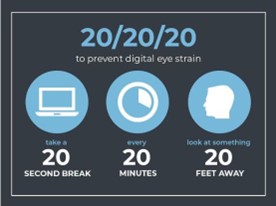
Follow the 20-20-20 rule: every 20 minutes look 20 feet ahead for 20 seconds. Position the computer screen to avoid glare, particularly from overhead lighting or windows, or consider using an anti-glare filter. Adjust the brightness and contrast on the screen and, if necessary, enlarge the print. Ensure the correct comfortable body posture, with the screen about 4 – 5 inches below eye level and 20 – 28 inches from the face. Most importantly, to minimise dry eyes, make a conscious effort to remember to blink often. If the eyes feel dry, use artificial tears or ask your optometrist to recommend lubricating eye drops. Increase the humidity of the air. Following a diet rich in antioxidants and essential fatty acids or taking nutritional supplements can help improve eye health and reduce eye strain. |
||||
Don’t stare at the screen for an extended period of time without a break. Don’t work on the computer in a very bright or dimly lit environment. Don’t forget to blink, blink, blink! |
||||