COMPUTER VISION SYNDROME: MYTHS AND FACTS
 |
||||||||
|
In recent years, the amount of time people spend on all types of digital devices has significantly increased, leading to computer vision syndrome, or digital eye strain, and affecting over 50% of people, including both children and adults.
Computer vision syndrome is not one specific problem, but rather a range of symptoms of eye discomfort that occur after focusing on a screen for a prolonged period of time. Many of the visual symptoms experienced are temporary and will decline after stopping or taking a break from computer work or use of the digital device. However, some individuals may experience continued reduced visual abilities and if nothing is done to address the cause of the problem, the symptoms will continue to recur and perhaps worsen with future screen use. With prolonged time spent on a computer or digital device, the eye movements required place increased demands on the visual system and the eyes need to work harder to perform effectively. Moving back and forth, looking down at papers then back up to the screen, reacting to changing moving images, they are constantly shifting focus and sending rapidly varying images to the brain. Added to that, there is flicker and glare from the screen and incorrect viewing angles and distances. We tend to blink less frequently when staring at screens, causing the eyes to become dry. Over time, the eyes begin to feel tired, dry and itchy, there may be excessive watering, blurred or double vision, and associated headaches, neck or shoulder pain. |
||||||||
|
MYTH: “I wear prescription glasses for shortsightedness, so I can work comfortably on the computer.” FACT: Corrective eyewear for refractive conditions cannot always prevent the effects of prolonged screen time. The prescription may be suitable for certain distances, but not for the specific viewing distance of the computer screen. Lenses prescribed to meet the unique visual demands of computer viewing may be needed. Special lens designs, lens powers or lens tints or coatings may help to maximise viewing and minimise discomfort. MYTH: “I don’t normally wear glasses so wouldn’t need them for the computer.” FACT: Many people who do not require the use of glasses for other daily activities may benefit from glasses prescribed specifically for computer use. Others may have a minor vision problem which does not require correction but may be a contributing factor to the discomfort and eyestrain resulting from screen use. MYTH: “My work is not affected by digital eyestrain.”
FACT: According to research, digital eye strain does in fact affect work productivity and computer work accuracy, even if symptoms are mild. As the day progresses and screen time accumulates, eye muscle fatigue and physical discomfort due to poor posture, will significantly affect accuracy, productivity, and comfort. MYTH: “There is no treatment for eyestrain due to digital screens.” FACT: A vision therapy programme is a structured programme of visual activities that can significantly improve the symptoms associated with digital eye strain in both children and adults, by training the eyes and the brain to work together more effectively. MYTH: “Screens are a part of our lives. There is nothing we can do to prevent digital eyestrain.”
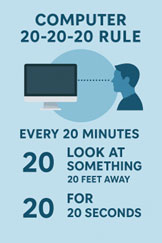
FACT: Experiencing computer vision syndrome does not mean we need to simply learn to live with it or completely give up our screen time. A few simple changes can be made which help alleviate the discomfort. Ensure that the computer screen is positioned slightly below eye level and at a comfortable distance from the eyes. Reduce glare and adjust computer settings such as brightness, contrast and colour to minimise eyestrain. The working environment should have appropriate lighting, ventilation and seating that facilitates a comfortable posture. Take regular breaks doing non-screen activities and follow the 20-20-20 rule – every 20 minutes look at something 20 feet away for 20 seconds. Be conscious of blinking frequently to prevent the eyes from becoming dry and irritated. |
||||||||
|
If you are experiencing symptoms of computer vision syndrome, schedule an eye examination. As well as monitoring your eye and visual health, your optometrist may recommend eye drops to provide relief from dry eyes or glasses designed specifically for computer use. Children’s eyes are vulnerable to strain from looking at screens and should be regularly checked. Make sure that computers they use are set up at the right height and in the best light. Encourage them to take frequent breaks from the screen, preferably outdoors, to give their eyes a rest. |
||||||||